Showing posts with label Recommendations. Show all posts

Friday, 28 July 2017

Fix Weak WiFi Signal Reception After Windows 10 Upgrade

Last Monday - July 24, 2017, after delaying it for a couple of months, I finally installed the latest Windows 10 upgrade on my HP EliteBook.

I let the upgrade run overnight and just wrapped up the process when I woke up the next day.

After the fresh reboot running on the freshest version of the operating system, I immediately noticed a major issue that could affect my productivity on the laptop:

For some reason, the software update weakened by notebook's WiFi signal reception.


I immediately checked tech forums looking for a possible solution and I was surprised that so many consumers have actually experienced the exact same problem.

Thankfully, the issue is not hard to resolve. In fact, you just need to make a few clicks on your touchpad to fix it.

If you're currently facing the same conundrum, try this solution:

1. On your Taskbar, click on the Search Box beside the Windows button and type "Device Manager", click on the first result.

2.  In Device Manager, click on Network Adapters.

3. Under Network Adapters, look for your WiFi adapter and click on it. The most common ones are made by Intel, Atheros, or Qualcomm.

4. In the Window that will pop up, click on Advanced tab.

5. Under Advanced Tab, go to Roaming Aggressiveness (or Roaming Sensitivity in some notebooks).

6. In the 'Value' drop-down menu on the right section, choose "5. Highest"

7. Click OK button.

8. Restart your laptop.
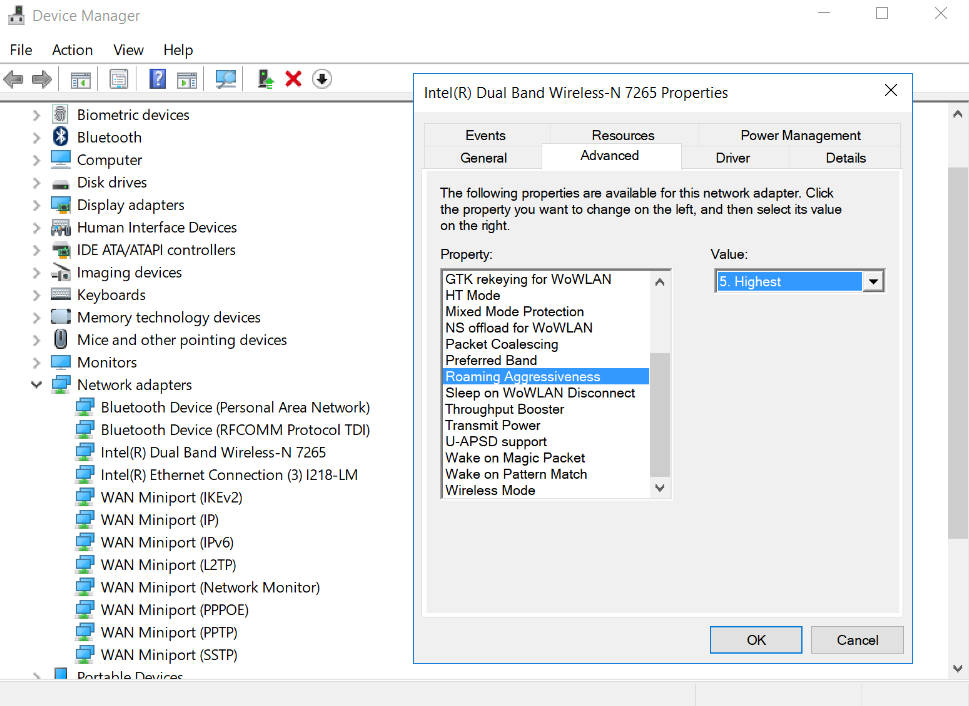
Fix Weak WiFi Windows 10

That's it! So easy, right?! Let me know if this fixed your problem via our comments section below.

Friday, 14 July 2017

Tips for Cleaning Laptop Keyboard To Avoid Damaging It

Earlier today, before having lunch, I decided - for some reason - that I should clean my laptop's keyboard. It's not really that dirty but I thought of giving it a go just for the heck of it.

So I got a damp cloth and started wiping the entire keyboard face rather recklessly.

My laptop is an HP EliteBook 1040 and it has a waterproof keyboard with island-style keys. I thought, "No need to go easy on this one. This notebook is rugged."

After a few rough swipes, I didn't notice that one of the corners of my damp cloth got trapped in that small gap lining the F8 key. When I pulled the cloth, it took the key along with it and the force broke a small plastic protrusion on the other side of the key that locks it in place.

So lo and behold, my keyboard is now officially broken -- and it's all my fault.

If I were more careful, this wouldn't have happened.

Tips for Cleaning Laptop Keyboard

There are two kinds of damage that a user can inflict on laptop's keyboard in the process of cleaning it. First is physical damage just like what I've done to my unit. And second is water-damage for keyboards that aren't water-proof or water-resistant.

For the benefit of those who are now also thinking about cleaning their notebook's keyboard, here are tips that you might want to follow to avoid damaging it (some of which, I should have followed, really):

1. Turn off the laptop first.

This may sound trivial but so many people don't follow this. Avoid being electrocuted or damaging the internal parts of your notebook by powering the unit off first before using a damp cloth to wipe the keyboard.

2. Use a slightly moist cloth, not one that's dripping wet.

Make sure that your damp cloth isn't too wet that water is dripping from it or liquid still comes out of it when you wring it.

3. Use your fingers along with the cloth.

This is the one tip that I should have followed: Press the middle part of your small piece of damp cloth against your pointer and index finger and hold it in place with your thumb. Use your fingers - lined with the cloth - to wipe the keys carefully. Don't just press the entire cloth against the keyboard and wipe it recklessly.

4. Take your time. Don't be hasty and careless.

Again, this is so simple but many people still don't follow this advice. I sure didn't. Don't assume that your notebook's keyboard is so rugged or tough that it can take a nasty beating. Nope, actually, it's very delicate and its internal parts are even more fragile.

5. No need to use a hair-dryer to finish the task.

If you followed Tip #2, you won't need a hair-dryer to remove moisture from your keyboard. Air coming from a hair-dryer can often get too hot and cause permanent physical damage on the delicate plastic keys. It's true. I totally messed up some keys on my old but reliable Sony VAIO T30 ultrabook because of this. Learn from my mistakes.

So there you have it! Just tried to make something good come out of my heart-breaking gadget experience earlier. I hope you found this post useful. If you did, kindly share it with your friends on social media.

Saturday, 13 May 2017

Best Gadget Gifts for Moms That You Can Buy in the Philippines

Are you planning to give your techy mom a cool gadget gift this Mother's Day? This post for you.

My mom is pretty techie herself. She loves playing casual games and snapping groufies with me and my younger brother using her smartphone. In fact, I think I got my love of gadgets from her -- or is it the other way around? Hmm. Anyway, like most of you, I'm now also trying to choose which new electronic items I should give her as present on this special day. I thought I'd share this list with you for inspiration.

1. Beautiful New Smartphone with Good Front Cam for Selfies and Powerful Rear Camera That Performs Well in Low Light

Gadget Gifts for Moms, OPPO F3

These days, smartphones - especially those in the upper midrange to high-end price brackets - can already work as a digital camera substitute. If your mom also loves taking photos of food or landscape and even selfies, you might want to give her a new cameraphone that she'd be proud to carry around whether at home, in the office, or when she's with you or her friends. My current recommendation for this is the OPPO F3, which sells in the Philippines for Php 16,990. I'm sure she'll love the Dual Front-Facing Camera feature with secondary wide-angle lens for great groufie shots.

2. A Sleek and Light Ultrabook That's Easy To Carry Around

Gadget Gifts for Moms, Acer Swift 7

As empowered women, our moms take on many roles. If your mom has a career that requires her to work on documents or to be online regularly, you might want to get her a slim and powerful laptop that she can easily travel with. Right now, my favorite ultrabook is the Php 69,990 Acer Swift 7, which still holds the record as the Thinnest Laptop in the World Today.

3. A Posh and Classy Fitness Tracker

Gadget Gifts for Moms, Fitbit Alta HR

Help your mom stay active and healthy by giving her a Fitness Tracker. My mom recently told me that my Fitbit Blaze looks amazing so I'm now thinking of getting her a Fitbit Alta HR, which is just as reliable but more feminine looking and more affordable at just Php 8,490.

4. A High-Capacity Powerbank with Extra Function

Gadget Gifts for Moms, Jumpu Powerbank

Many powerbanks with 10,000 mAh capacity are now flooding the market. If you're planning to give one to your mom, then I would suggest picking a model that has an extra functionality just to make her feel more special. For instance, you can choose the Php 995 Jumpu Duo that already has built-in microUSB and Lightning cables so your mom won't have to carry those wires separately.

Gadget Gifts for Moms, Powerbank with Flashlight

You might also want to check out Jaguar Powerbank with Large LED Torchlight, which is available at Kimstore for just Php 550, as well the Asus ZenPower 2 with Flashlight that goes for Php 750 at some gadget shops in malls. Our moms are the light of our lives and I'm sure that they'll appreciate having any of these two powerbanks in their bags or pouches.

5. Cute, Colorful Earphones with Good Sound Quality

Gadget Gifts for Moms, Elecom Earphones

My mom loves watching music videos and TV series on her smartphone so I thought of getting this colorful Japan-made pair for her. I got it at Elecom for only Php 900 and what's nice is that its sound quality is already comparable to that of Apple Earpods, which is more expensive, and it already has tangle-resistant flat wires, four pairs of ear caps, and it even comes with a free cord keeper! Sweet, right?

So there you have it! For me, these are the best gadgets that we can give our moms this year. Do you have additional recommendations or suggestions? Feel free to to share them with us via our Facebook comments section below. Thanks!